
Production & shop floor

Shop-floor tracking - two views of the same factory

The shop floor and the office don't need the same UI. MonitGlass ships two: a terminal/mobile UI built for the floor, and a planning & dashboard UI for the office.
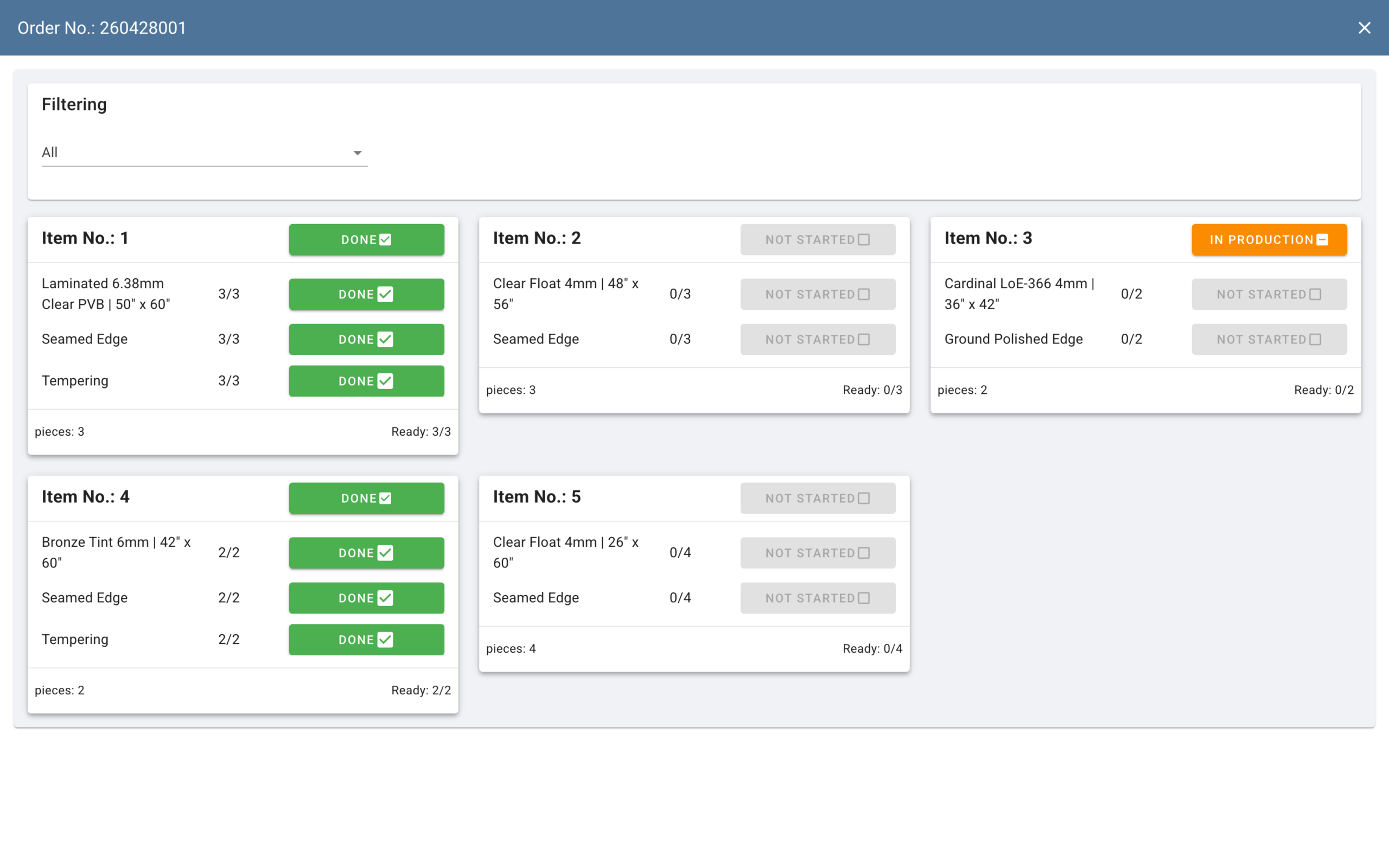
en__production preview__desktop scaled
What the floor sees vs what the office sees

Two views, one system

The same production data, rendered for two different jobs. No re-entry between them - what the operator confirms on the floor shows up on the office dashboard

On the floor — terminal & mobile

The UI operators actually touch. Stage-by-stage confirmation, QR scan to open a task, per-pane confirmation for IGU assembly,
element / order-item to-do lists for monolith glass. No typed logins, no admin screens, no spreadsheets.

  • Mobile app (iOS / Android) for phones and tablets
  • QR-driven – scan a label, confirm the stage
  • Per-pane / per-element confirmation for IGU and monolith glass
  • Operators only see what they need – no commercial data exposed on the floor

In the office — dashboard & planning

The UI a supervisor, planner or customer-success manager runs. Task list with counts at the head;
search and filter by customer, material, thickness, processing; drill down to any active order; the
work-schedule reflects production progress as stages are confirmed and the list is refreshed. Production task list with task counts at the head

  • Search / filter by customer, material, thickness, processing
  • Order status moves toward “production finished” automatically as stages are confirmed
  • Feeds the work-schedule Gantt and the operational reports
  • Full ERP scope – orders, pricing, customers, logistics, settings
Key capabilities

What's in the shop-floor tracking module

service_2_1

Production task list

What's in production right now - the work the floor is on, updated as stages are confirmed; refresh to see the latest.

service_2_2

Search & filter active orders

Find a production order by order, customer, material, thickness or processing type - useful when a customer rings asking where their job is.

service_2_3

Per-stage confirmation

Operators confirm each step across the processing stages the factory runs - shape-cut, cutting, drilling, grinding, chamfering, surface treatment and IGU assembly - so progress is recorded as it happens. IGU assembly also has per-pane confirmation on top of that.

service_2_3

Task counts at the head

The task list shows counts up front - a supervisor's at-a-glance picture of the floor without opening every order.

service_2_3

Order status flows back

Confirmed stages move the order toward "production finished" automatically - the office sees progress in the order's status without chasing.

Works with

Related modules

Order management

Where an accepted quote becomes an order and runs the lifecycle.

Mobile app

Confirm stages and scan from a phone or tablet on the floor - no PC needed at the machine.

QR labels & prints

Order-set PDFs and XLS generated from the schedule.

FAQ

Shop-floor tracking - common questions

No - operators confirm stages from a shop-floor terminal or the mobile app on a phone or tablet, so there's no requirement for a workstation at every machine.

Seven stage types: shape-cut, cutting, drilling (holes), grinding, chamfering, surface treatment and IGU assembly (for insulated glass). Operators confirm each one as it's done - through the shop-floor terminal, the mobile app, or by QR scan from the order label.

It's built for shop-floor use - terminal or mobile, stage-by-stage confirmation, QR scanning.