
Production & shop floor

Glass production schedule

A Gantt view of production — see the orders running through the floor, day by day, with the customer, glass type and where each one sits. One screen instead of a whiteboard or a spreadsheet.
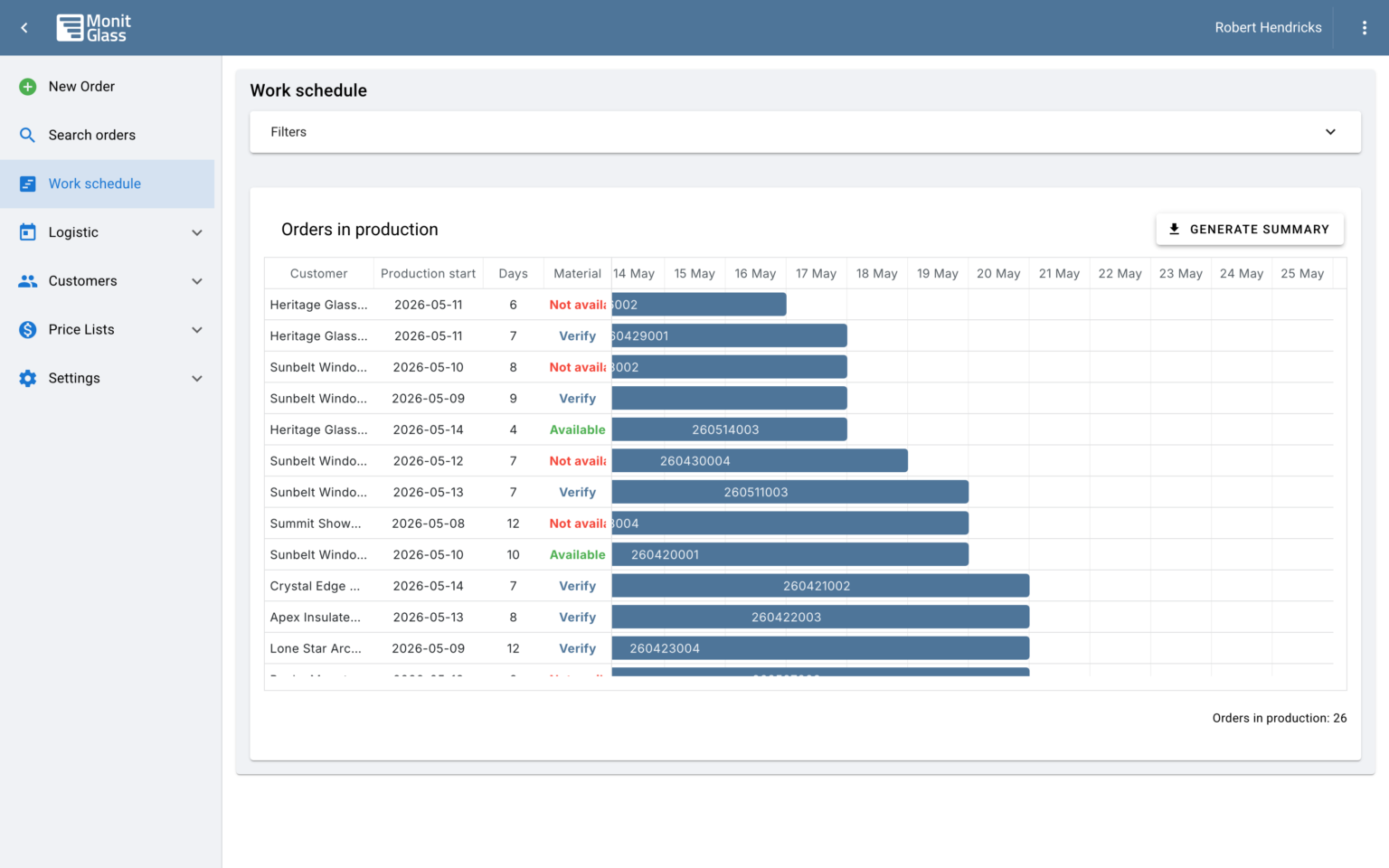
MonitGlass work schedule gantt view
Key capabilities

What's in the work schedule module

service_2_1

Gantt timeline view

A visual timeline of the orders running through production - customer, glass type, duration, day by day.

service_2_2

Only in-production orders show

Draft offers and unconfirmed quotes don't clutter the view - the schedule shows orders that are confirmed and ready to run, so you're looking at work that's actually scheduled.

service_2_3

Print order sets

Select work on the schedule and export an order-set PDF or XLS.

Works with

Related modules

Order management

Where an accepted quote becomes an order and runs the lifecycle.

Shop-floor tracking

Operators confirm each machining and processing stage; the order's status updates accordingly.

QR labels & prints

Order-set PDFs and XLS generated from the schedule.

FAQ

Work schedule - common questions

An order shows up on the schedule once it's confirmed and moved into production status - so you're looking at work that's actually ready to run, not draft offers or unconfirmed quotes. As shop-floor stages are confirmed and the order's status updates, refreshing the schedule picks up the current state.